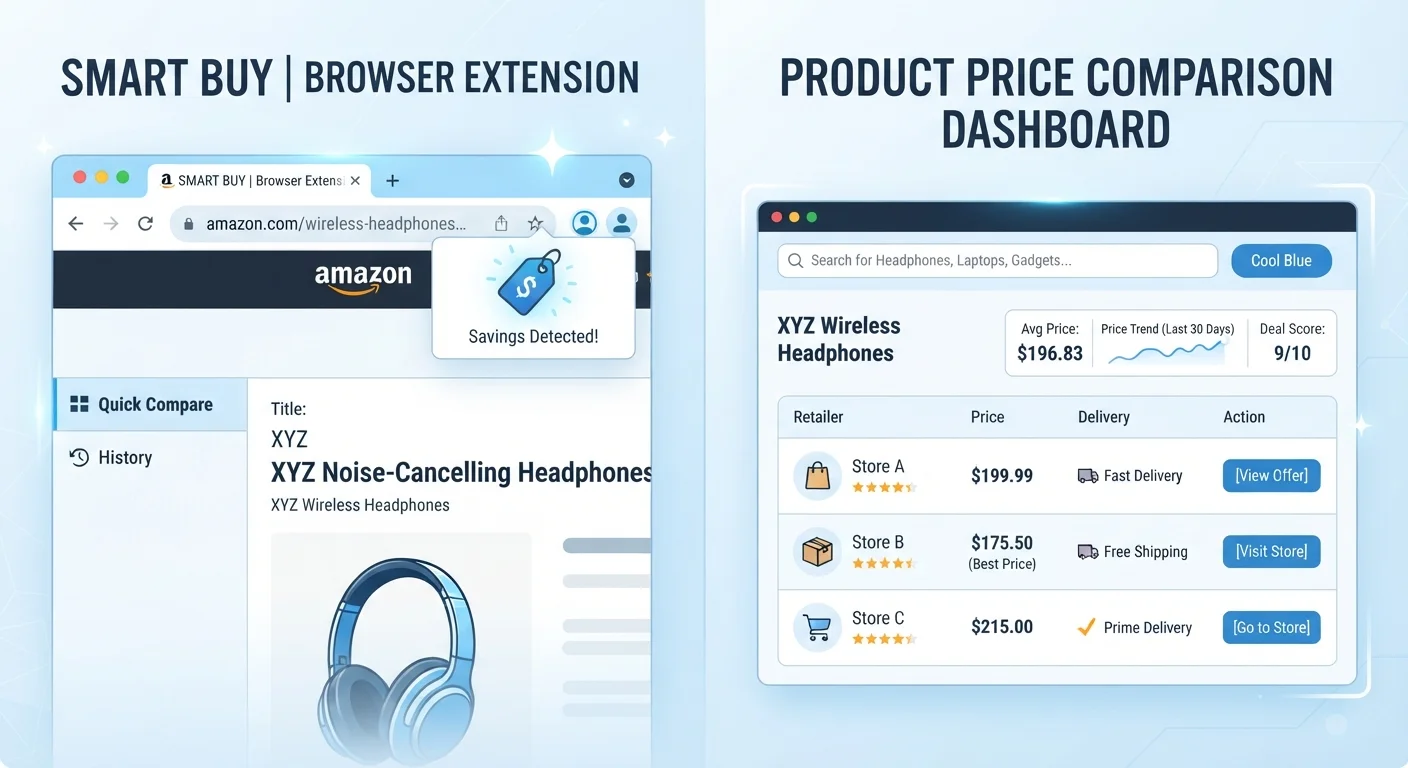
How Each Tool Actually Works
Browser extensions sit inside your browser and monitor the product page you're currently viewing. When they detect a recognizable item, they query their partner retailer databases and surface competing prices or available coupons in a small popup. The entire process is passive - no new tab, no separate search required.
Dedicated comparison sites operate differently. You navigate to the platform, search for a product, and the site returns a structured list of sellers, prices, and - on more sophisticated platforms - a historical price chart showing how that item's cost has moved over time. Coverage is broader because these platforms invest specifically in maintaining large retailer feeds.
For a fuller orientation to both tool categories, see Making Sense of Price Comparison Tools.
| Criterion | Browser Extensions | Dedicated Comparison Sites |
|---|---|---|
| Setup required | One-time install | No install; browser visit |
| Retailer coverage | Narrower partner network | Broader multi-seller coverage |
| Data freshness | Often live API queries | Feed sync intervals vary |
| Historical price data | Rarely available | Often included |
| Ease of use | Passive, in-page popup | Requires deliberate search |
| Transparency of ranking | Affiliate weighting possible | Sponsored placement common |
| Best use context | Spontaneous page-level check | Pre-purchase research phase |
Coverage and Data Freshness: Where Each Approach Falls Short
Extensions typically partner with a curated set of major retailers. That means niche sellers, marketplace third-party listings, and regional outlets may be invisible to the tool. If the product you're researching is sold primarily through smaller channels, an extension may return only one or two competing prices - or none at all.
Dedicated comparison sites cast a wider net, but they face their own data-freshness challenges. Retailers push price updates at different intervals, and some comparison platforms only sync feeds every few hours. A price that appears on a comparison site may not reflect a flash sale or a sudden markdown that went live in the past hour.
~4 hrs
Typical retailer feed sync delay on comparison sites
Industry analyses of major comparison platforms suggest pricing feeds are commonly refreshed on schedules ranging from one to several hours, meaning listed prices may lag behind live retailer changes.
30-40%
Share of comparison site results that may be sponsored listings
Consumer advocacy researchers have noted that a significant portion of results on some aggregator platforms reflect paid placement rather than purely price-ranked ordering.
Extensions, by contrast, often query live retailer APIs at the moment you land on a page, which can make their data more current for the specific retailers they cover - even if their coverage is narrower overall. Understanding these trade-offs in depth is useful; The Trade-Offs of Using Price Comparison Aggregators covers this in detail.
Transparency, Bias, and What You're Not Being Shown
Both tools have potential neutrality issues worth understanding. Comparison sites sometimes operate on a cost-per-click model, meaning retailers pay to appear or to rank higher in results. This doesn't automatically mean prices shown are wrong, but it does mean the ordering of results isn't purely algorithmic. Look for sites that clearly disclose their business model and allow you to sort results independently of sponsored placement.
Extensions are often built by companies with their own affiliate relationships. When an extension surfaces a "lower price" at a partner retailer, there may be a financial incentive behind that recommendation. That doesn't make the price inaccurate, but it's worth being aware that some suggestions are weighted toward partner networks.
Neither tool is fully neutral. The most reliable approach is to use a comparison site to map the broad price landscape, then verify the specific page price with an extension - or manually. For a structured way to do this before any purchase, run through our pre-purchase price benchmarking checklist.
Always Verify Directly With the Retailer
Prices shown by both browser extensions and comparison sites are reference points, not guarantees. Shipping costs, membership fees, and regional pricing variations can change the final checkout total significantly. Before committing to a purchase based on a comparison tool's data, confirm the current price directly on the retailer's own product page. This is especially important for large-ticket items where small discrepancies add up quickly.
Putting Both Tools to Practical Use
For routine, lower-stakes purchases, a browser extension provides a fast sanity check with minimal friction. For larger purchases - electronics, appliances, auto parts, or anything where even a small percentage difference represents real dollars - start with a dedicated comparison site to establish a price floor, note the historical trend, and identify which seller types are active in that category.
Automotive shoppers in particular can benefit from comparison research before visiting dealerships or purchasing parts. See practical strategies for managing car costs for context on where price benchmarking fits into broader vehicle expense planning.
When the stakes are high, our complete guide to comparing prices like a savvy consumer outlines how to layer multiple tools - including both extensions and comparison sites - for the most complete picture. Neither tool alone is sufficient for confident price benchmarking; used together, they cover each other's gaps.
This article is for general informational purposes only. Prices, tool features, and retailer partnerships change frequently - always verify pricing directly with the seller before making a purchase decision.